This article covers the top 3 improvements made to the developer experience of Python 3.15 users:
- improved error messages
- more colours
- default UTF-8 encoding
15 days of Python 3.15
To celebrate the release of Python 3.15, over the next 15 business days I'll be writing about a new 3.15 feature every day. Explained clearly and with examples so you don't have to sift through the changelog.
Subscribe to receive this free email series:
If you want, you can also check the schedule of the upcoming emails.
Improved error messages
Over the past few years, lots of effort has been poured into improving Python's error messages. Python 3.15 is no exception, as it introduces three improved types of error messages.
Errors in accessing nested attributes
If you get an AttributeError exception when accessing a name of an object, but that object has another member that has the correct name, Python suggests it:
class Inner:
    def __init__(self):
        self.value = 42

class Outer:
    def __init__(self):
        self.inner = Inner()

o = Outer()
o.value
# AttributeError: 'Outer' object has no attribute 'value'.
# Did you mean '.inner.value' instead of '.value'?
Incidentally, while Python 3.15 was in alpha, I found and reported a bug with this feature that was fixed in just a couple of hours!
Checking methods from popular programming languages
If you get an AttributeError when trying to access a method from a built-in type, Python starts by checking if that's a typo.
For example, list.pp will ask if you meant to type list.pop.
Now, if there's no “obvious” typo, Python will also check a static table of common methods from other languages, like JavaScript, and suggest the Python equivalent.
For example, in JavaScript, you use push to add elements to a list:
// JavaScript
my_list = [1, 2]
my_list.push(3)
console.log(my_list)  // [1, 2, 3]
In Python, if you try to use .push on a list, Python asks whether you meant to use append:
# Python
my_list = [1, 2]
my_list.push(3)
# AttributeError: 'list' object has no attribute 'push'.
# Did you mean '.append'?
This looks especially neat when the Python equivalent is a syntactic feature, for example adding key/value pairs to dictionaries:
d = {}
d.put(key, value)
# AttributeError: 'dict' object has no attribute 'put'.
# Use d[k] = v.
Methods from mutable types used in immutable types
If you try to use a method of a mutable type in an immutable type, Python will ask whether you meant to use the mutable type in the first place:
my_tuple = (1, 2)
my_tuple.append(3)
# AttributeError: 'tuple' object has no attribute 'append'.
# Did you mean to use a 'list' object?
As of Python 3.15, there are three pairs of mutable and immutable data types:
-
listvstuple -
dictvsfrozendict(learn more aboutfrozendict, new in Python 3.15) -
setvsfrozenset(learn more aboutsetandfrozenset)
Fixing typos when deletting attributes
When you try to delete an attribute and get an AttributeError, Python will check if the error arises from a likely typo:
class MyClass:
    pass

obj = MyClass()
obj.bananas = 42
del obj.banaas
# AttributeError: 'MyClass' object has no attribute 'banaas'.
# Did you mean '.bananas' instead of '.banaas'?
Correct usage of the terms “parameter” and “argument”
The terms “parameter” and “argument” are commonly used interchangeably but they mean different things. In Python 3.15, more than 10 error messages were fixed to use the term “parameter” instead of “argument”.
Here's an example using a syntax error when defining a function:
def foo(/, arg1):
    pass

# Python 3.15 error:
# SyntaxError: at least one parameter must precede /
In 3.14, the error reads “at least one argument must precede /”.
Historical record of improvements
The table below summarises the concerted effort that has been put into improving errors messages in Python over the past few years:
| Python version | Example of improvement | Learn more |
|---|---|---|
| 3.10 | Syntax errors point to where a closing ) or } is missing |
Link |
| 3.11 | Tracebacks highlight the part of the line that raised the exception | Link |
| 3.12 | Imports from modules with typos suggest the correct objects | Link |
| 3.13 | Tracebacks are coloured | Link |
| 3.14 | Python suggests fixes to typos in keywords | Link |
More colour in the terminal
Why is syntax highlighting a useful feature? Because consistently colour-coding different entities (like keywords, built-ins, integers, strings, ...) makes it easier to parse the code you're reading.
In Python 3.13, with the changes to the Python REPL, folks started using more colour... In Python 3.14, syntax highlighting was added to the REPL itself and to some of the CLIs from the standard library... And Python 3.15 adds even more colour:
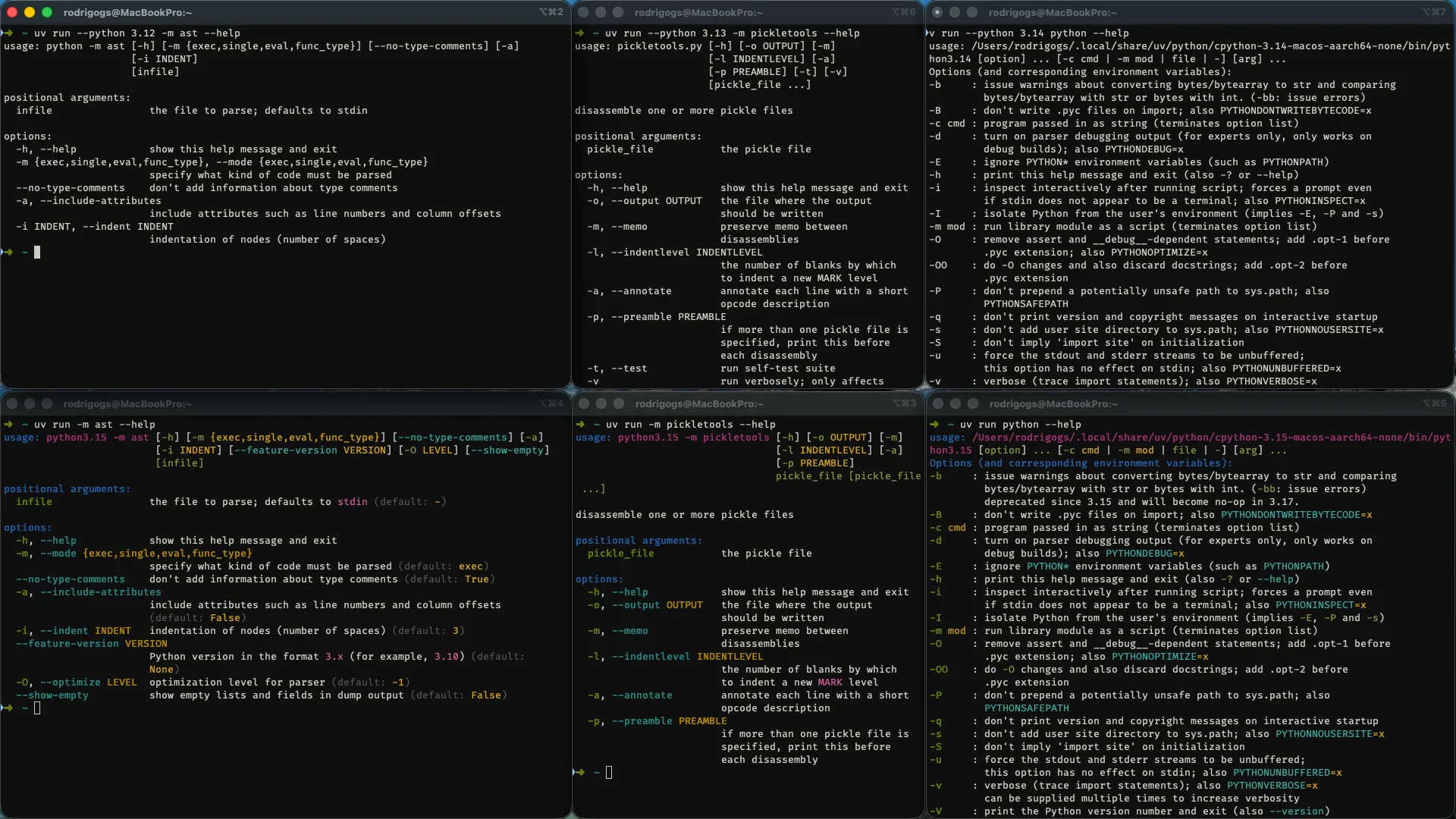
The image above shows the result of running --help on three Python CLIs before 3.15 and on 3.15.
The colour helps distinguish arguments, options, flags, default values, and more.
The key point is that the module argparse from the standard library, that allows creating CLIs, now supports colour.
This means that your own CLIs can be coloured if they're built with argparse.
UTF-8 is now the default file encoding
UTF-8 is now the default file encoding for all your calls to the built-in open.
This was already the case on Unix systems, but not for Windows users.
Suppose you write a file in a Unix machine:
with open("python.txt", "w") as f:
    f.write("I like Python 🐍🚀!\n")
Then, you open your Windows machine and open the file to read:
with open("python.txt", "r") as f:
    contents = f.read()
# UnicodeDecodeError: 'charmap' codec can't decode byte 0x90 in position 16: character maps to <undefined>
Except the code doesn't run, because you get an exception!
In Python 3.14 and earlier, using open in a Unix machine would be equivalent to using open(..., encoding="utf8").
On the other hand, open on Windows would be equivalent to using open(..., encoding="cp1252"), which is not compatible with UTF-8.
From Python 3.15 onward, the default encoding is always UTF-8, which is the de facto standard used (almost) everywhere else. This increases interoperability between OSes but also between Python and other tools.
Python 3.15 brings much more to the table
From the two new built-ins frozendict and sentinel, to lazy imports, package startup configuration files, typing improvements, or more colour everywhere, Python 3.15 has a lot more to offer.
If you want to learn more about what's new in Python 3.15, take a look at the “15 days of Python 3.15” series I'm running.
For 15 days, I'll explain a new Python 3.15 feature every day.
Get the free 3.15 email series:
References
- PEP 686 Make UTF-8 mode default, https://peps.python.org/pep-0686/ [last accessed 20-10-2026];
- CPython GitHub pull request 146407, https://github.com/python/cpython/pull/146407 [last accessed 20-10-2026];
- CPython GitHub pull request 133382, https://github.com/python/cpython/pull/133382 [last accessed 20-10-2026];
- CPython GitHub issue 146171, https://github.com/python/cpython/issues/146171 [last accessed 20-10-2026];
- What's new in Python 3.15, https://docs.python.org/3/whatsnew/3.15.html [last accessed 20-10-2026];
- What's new in Python 3.14, https://docs.python.org/3/whatsnew/3.14.html [last accessed 20-10-2026];
- What's new in Python 3.13, https://docs.python.org/3/whatsnew/3.13.html [last accessed 20-10-2026];
- What's new in Python 3.12, https://docs.python.org/3/whatsnew/3.12.html [last accessed 20-10-2026];
- What's new in Python 3.11, https://docs.python.org/3/whatsnew/3.11.html [last accessed 20-10-2026];
- What's new in Python 3.10, https://docs.python.org/3/whatsnew/3.10.html [last accessed 20-10-2026];